ES03 - Host, Tenant and Session Hydration
Revisions History
| Version | Date | Changelog |
|---|---|---|
| 2.1 | 2026-03-15 | Updates the pipeline to not use Origin header. |
| 2.0 | 2026-03-05 | Changes the architecture from Go Echo to Rust Axum. |
| 1.0 | 2026-02-03 | Initial version. |
Summary
This document outlines the process of ‘hydrating’ a handler’s context throughout the pipeline of Axum routing.
Rationale
This process is done to provide the best level of isolation, without having to burden the client or the API users with a lot of query parameters, as most of them should be done via a browser. This logic may be changed later, but the logic of injecting them into handlers would not change.
The Pipeline
When a request hits the backend, it goes from these layers from layer 1 as the outermost layer and goes inwards. When the response comes out, it goes the opposite direction from layer N downwards to layer 1. This is how middlewares work, but for this project so far, most of these layers only serve as a gatekeeper and checking for various information in the request.
There are a total of 4 authentication layers (or if you can call it that):
- Session: Dictates who the user is (Identity). Specified in a Cookie named
session_id. - Tenant Scope: Dictates the scope the user is in (Where). Specified in a Header named
X-Tenant-Slug. This specifies the slug of the tenant, such astwinbells.foodbasket.appwould mean the tenant’s slug would betwinbells. - Branch Scope: Dictates which branch the user is in (Where). Specified in a Header named
X-Branch-ID. This specifies a valid UUID of a branch for a tenant. - App Context: Dictates how the application should work (What). Specified in a Header named
X-App-Context. This specifies what type of Persona to fetch for the current user.
For more details on each header or cookie, read the corresponding layer. All diagrams are done in PlantUML by me, and a descriptive description written by Gemini.
Layer 1: Cross-Origin Resource Sharing
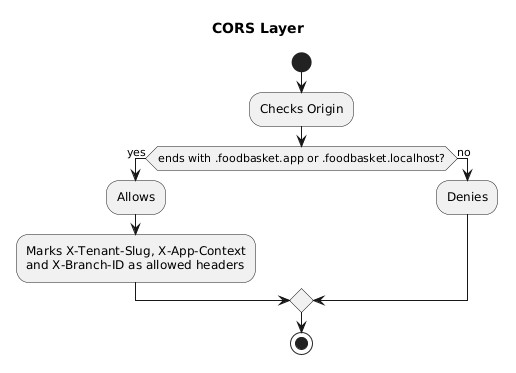
- Start: The process begins when a request hits the CORS layer.
- Origin Check: The system extracts the
Originheader from the request. - Domain Validation: A conditional check determines if the origin ends with
.foodbasket.appor.foodbasket.localhost. - Authorized Path (Success):
- The origin is Allowed.
- The system white-lists the following custom headers for the request:
X-Tenant-SlugX-App-ContextX-Branch-ID
- Unauthorized Path (Failure):
- If the origin does not match the required domains, the request is Denied.
- End: The validation process concludes.
Layer 2: Tenant Hydration
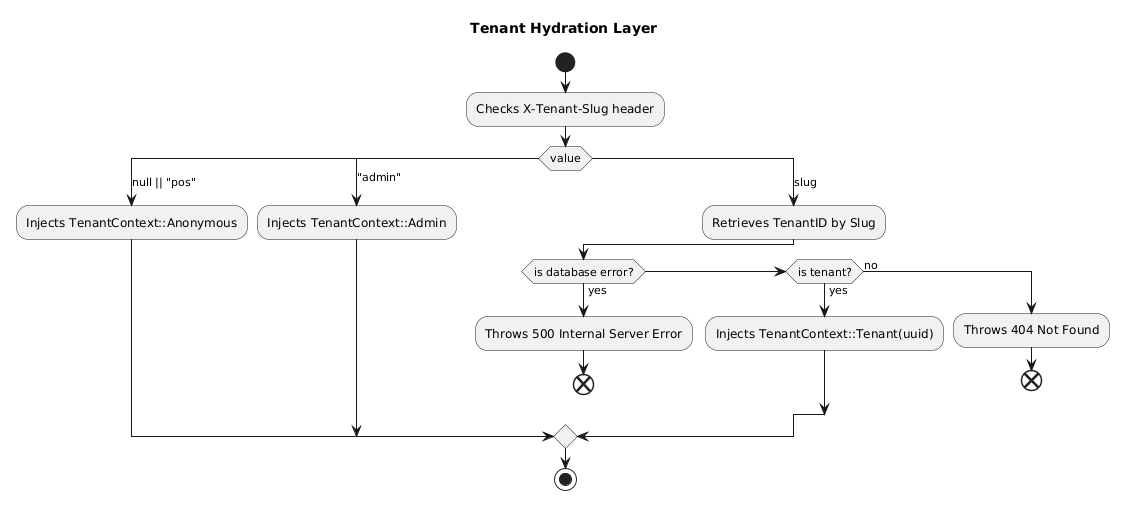
- Start: The process begins by checking the
X-Tenant-Slugheader in the request. - Value Branching: The system evaluates the value of the header:
- If null or “pos”: It injects
TenantContext::Anonymous. - If “admin”: It injects
TenantContext::Admin. - If a specific slug: It attempts to Retrieve TenantID by Slug from the database.
- If null or “pos”: It injects
- Slug Retrieval Validation:
- Database Error: If a database error occurs, it Throws 500 Internal Server Error and terminates.
- Tenant Found: If a valid tenant is found, it injects
TenantContext::Tenant(uuid). - Tenant Not Found: If no tenant matches the slug, it Throws 404 Not Found and terminates.
- End: Successful paths converge and the hydration process completes.
Layer 3: App Context Hydration
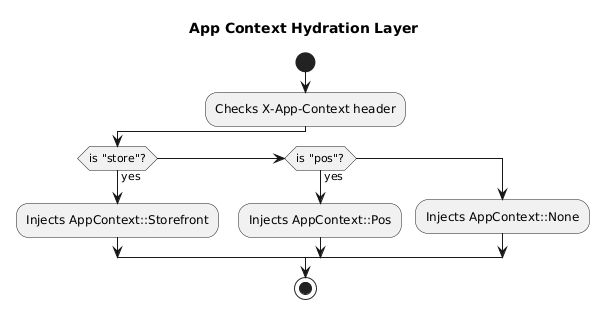
- Start: The process begins by inspecting the
X-App-Contextheader. - Context Check: The system evaluates the header value against specific keywords:
- If “store”: It injects
AppContext::Storefront. - If “pos”: It injects
AppContext::Pos. - If neither: It defaults to injecting
AppContext::None.
- If “store”: It injects
- End: The appropriate context is applied, and the process completes.
Layer 4: Session Hydration
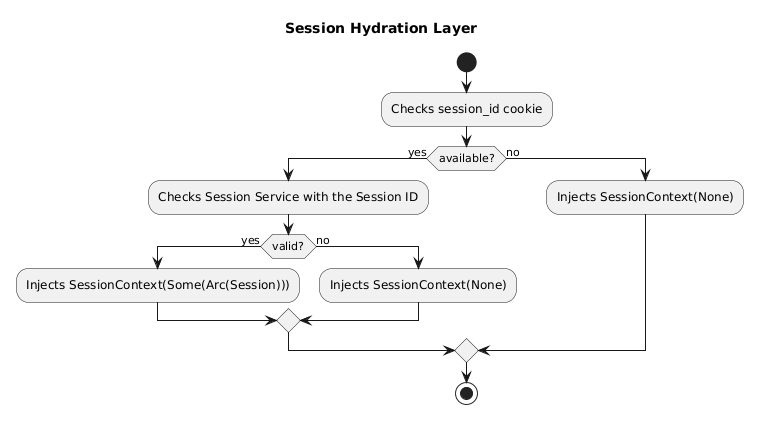
- Start: The process begins by checking for the presence of a
session_idcookie. - Cookie Availability:
- If not available: It injects
SessionContext(None)and proceeds to the end. - If available: The system moves to the validation phase.
- If not available: It injects
- Session Validation:
- The system Checks Session Service with the Session ID to verify its status.
- If Valid: It injects
SessionContext(Some(Arc(Session))), providing active session data. - If Not Valid: It injects
SessionContext(None).
- End: All logical branches converge, and the session hydration is complete.
Layer 5: Profile Hydration
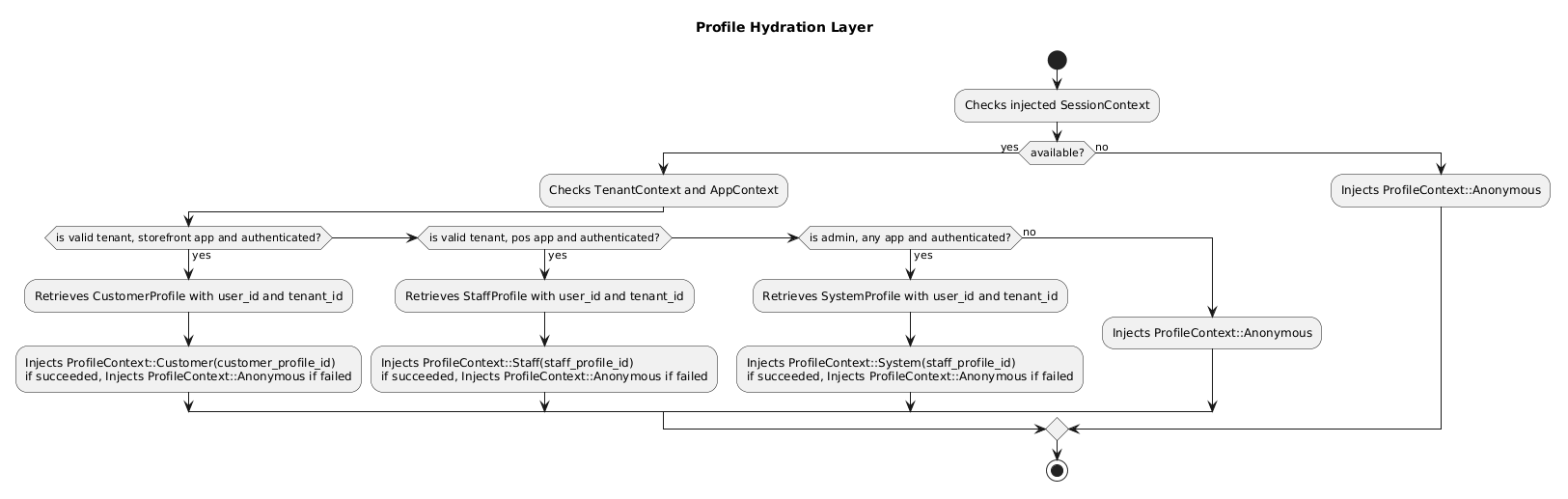
- Start: The process begins by checking the previously injected SessionContext.
- Initial Session Check:
- If not available: The system injects
ProfileContext::Anonymousand terminates. - If available: The system proceeds to check TenantContext and AppContext.
- If not available: The system injects
- Authentication & Role Branching: The system evaluates three specific scenarios:
- Customer Path: If it is a valid tenant, storefront app, and authenticated:
- Retrieves
CustomerProfileusinguser_idandtenant_id. - Injects
ProfileContext::Customer(orAnonymousif retrieval fails).
- Retrieves
- Staff Path: If it is a valid tenant, POS app, and authenticated:
- Retrieves
StaffProfileusinguser_idandtenant_id. - Injects
ProfileContext::Staff(orAnonymousif retrieval fails).
- Retrieves
- Admin Path: If it is an admin, any app, and authenticated:
- Retrieves
SystemProfileusinguser_idandtenant_id. - Injects
ProfileContext::System(orAnonymousif retrieval fails).
- Retrieves
- Customer Path: If it is a valid tenant, storefront app, and authenticated:
- Fallback: If none of the above conditions are met (the “no” path from the admin check), it defaults to injecting
ProfileContext::Anonymous. - End: All paths converge to complete the profile hydration.
Layer 6: Branch Hydration
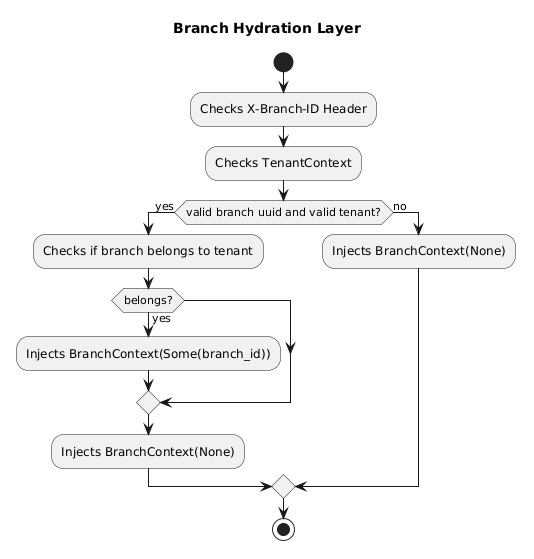
- Start: The process begins by inspecting the
X-Branch-IDheader and the current TenantContext. - Initial Validation: The system checks if the request contains a valid branch UUID and a valid tenant.
- If No: It injects
BranchContext(None)and proceeds to the end. - If Yes: The system moves to ownership verification.
- If No: It injects
- Ownership Check: The system verifies if the specified branch actually belongs to the tenant.
- If it belongs: It injects
BranchContext(Some(branch_id)). - If it does not belong: The process flows through a merge point to a fallback.
- If it belongs: It injects
- Fallback Injection: Following the “no” path from the ownership check (or after the successful injection logic completes), the flow ensures a
BranchContext(None)state is applied if the specific ID wasn’t successfully attached. - End: All branches converge, and the hydration process concludes.
Layer 7: Policy Hydration
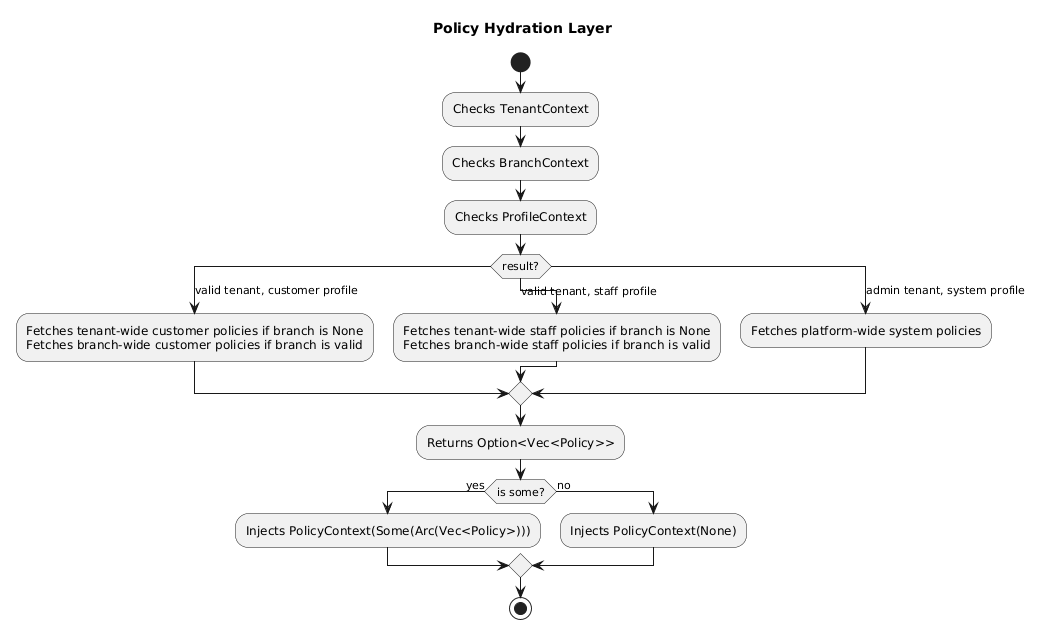
- Start: The process begins by reviewing three existing contexts: TenantContext, BranchContext, and ProfileContext.
- Contextual Branching: The system determines which policies to fetch based on the combination of these contexts:
- Customer Path (Valid Tenant + Customer Profile):
- Fetches tenant-wide customer policies if the Branch is
None. - Fetches branch-wide customer policies if the Branch is valid.
- Fetches tenant-wide customer policies if the Branch is
- Staff Path (Valid Tenant + Staff Profile):
- Fetches tenant-wide staff policies if the Branch is
None. - Fetches branch-wide staff policies if the Branch is valid.
- Fetches tenant-wide staff policies if the Branch is
- System Path (Admin Tenant + System Profile): - Fetches platform-wide system policies.
- Customer Path (Valid Tenant + Customer Profile):
- Collection: The system aggregates the results into an
Option<Vec<Policy>>. - Final Injection:
- If Some: If policies were found, it injects
PolicyContext(Some(Arc(Vec<Policy>))). - If None: If no policies were found, it injects
PolicyContext(None).
- If Some: If policies were found, it injects
- End: The hydration process for the request policy concludes.
Layer 8: Request Solidify
- Wraps an
Arcover aRequestContext(which contains a cloned object of all the previous contexts) and injects it.